Dilapidations surveys
A clearer record of property condition.
Keep photographs and condition notes together as you walk the property. Mark the detail on the image, organise the findings and prepare a report for review.
3 active projects free. No credit card.
iPhone, iPad, Android and web.

App screenshot · sample project
[ The app ]
Native on your phone or tablet. Full dashboard on the web.
Capture issues on iOS or Android, then review, organise, and share your work from the web dashboard.
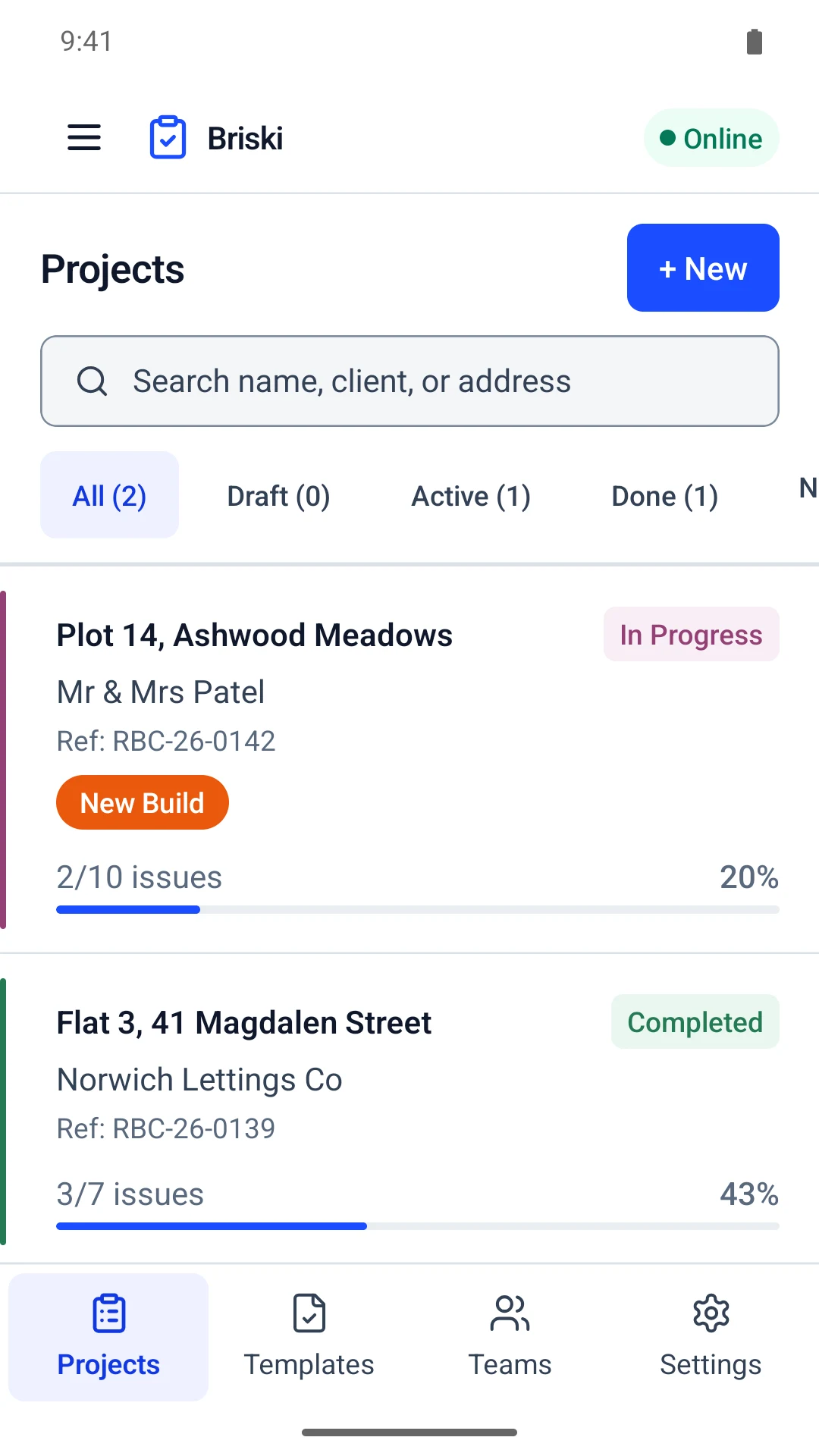


[ 01 / 06 — Projects ]
Every job at a glance — status, progress and who it's for.
[ 02 / 06 — Snag list ]
Priority, trade and location on every issue. Tick them off as they're fixed.
[ 03 / 06 — Issue ]
Photograph it, describe it, assign a trade and a due date.
[ 04 / 06 — Photo ]
Full screen, pinch to zoom. Share or bin it from here.
[ 05 / 06 — Annotate ]
Arrows, pen and text straight onto the photo. No argument about which crack.
[ 06 / 06 — Report ]
Choose a PDF layout and add your report branding.
[ The problem ]
Keep the condition record together.
Structured defect logging
Log each item of disrepair with location and description; include any relevant references in your notes. Attach multiple annotated photos. Everything is numbered and organised.
Photos that stay linked
No more folders of hundreds of images with filenames like IMG_4872. Every photo is linked to its defect, annotated with marks showing exactly what's wrong, and labelled with a location.
Professional PDF reports
Generate structured reports with your branding. Each item numbered, photographed, and described. Review the findings before sharing them with the people involved.
Multi-party sharing
Share the report as a PDF or send a live project link. Landlords, tenants, managing agents, and solicitors can all view the same findings in their browser. One source of truth.
Built for the reality of lease-end inspections.
A typical commercial dilapidations inspection involves walking an entire property, documenting every item of disrepair against the lease covenants, photographing evidence, and producing a schedule that multiple parties will scrutinise. The traditional approach — scribbled notes, camera roll full of unlabelled photos, three days back at the office assembling a Word document — is painful and error-prone.
Briski lets you build the schedule as you walk. Log each item with its location, a description of the disrepair, and any relevant references in your notes. Attach annotated photos that show exactly what you're referring to. By the time you leave the property, the schedule is largely written.
Generate a professional PDF that's structured clearly enough for all parties to work from. The landlord sees what needs fixing. The tenant sees what's being claimed. The solicitors see a documented, evidenced schedule. Review the report alongside the lease and any other documents needed for your instruction.
[ How it works ]
Four steps. Start to report.
Photograph
Walk the property floor by floor. Photograph each item of disrepair, from cracked tiles to damaged ceilings.
Log
Annotate photos and log each item. Note the location, element, description, and covenant reference. Set priority.
Report
Generate a numbered PDF schedule of dilapidations. Branded, structured, with all photos and annotations included.
Share
Share with all parties — landlord, tenant, managing agent, solicitor.
Coming soon · AI-assisted writing
Your inspection.
A head start on the write-up.
Start with what you saw. Briski’s upcoming AI tools will help turn photos and notes into a draft you can check, edit and make your own.
Your judgement stays in charge.
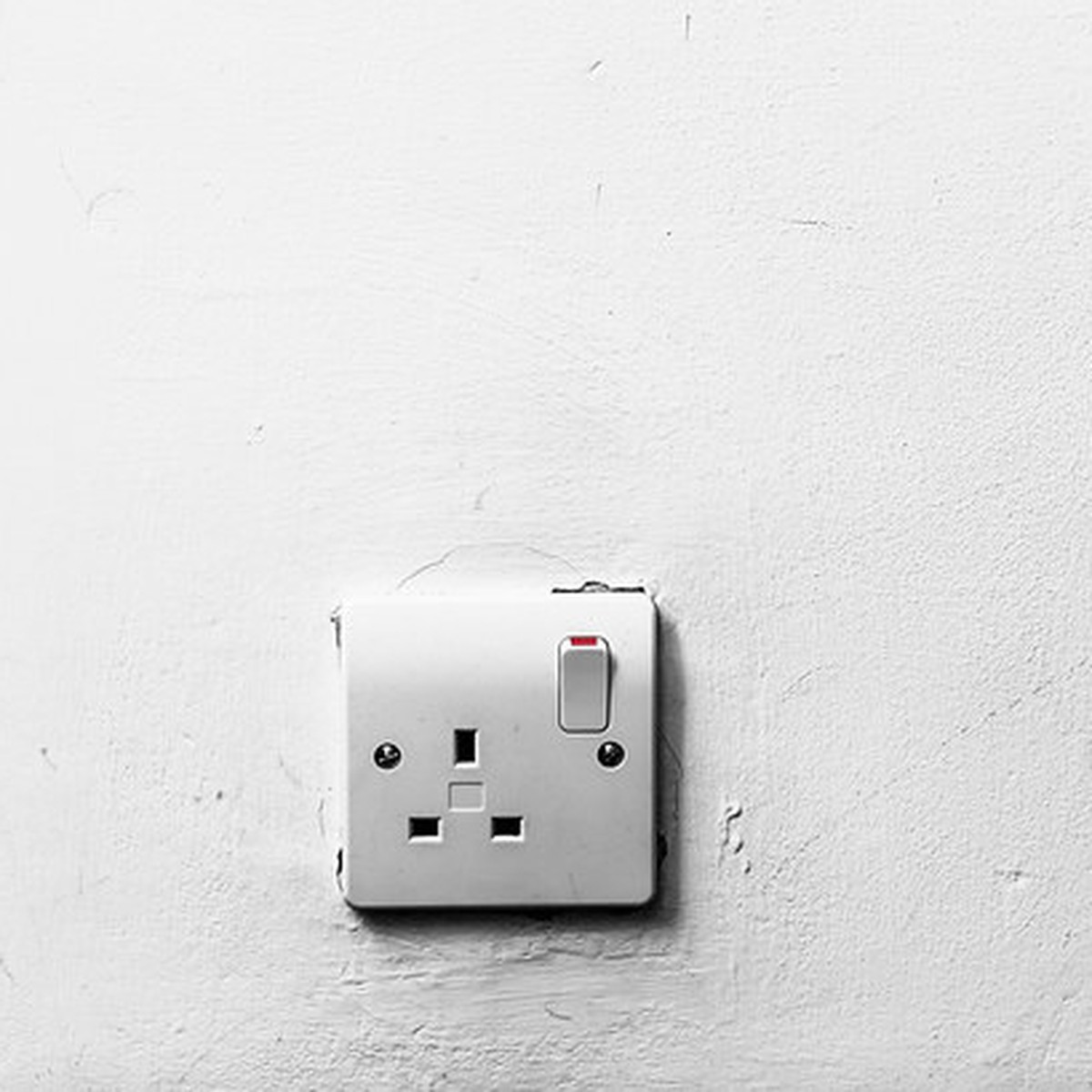
Example AI draft — for review
Photo → snag noteUneven wall finish around socket
The painted wall around the socket faceplate has an uneven, rough finish, with visible cracking and chipped edges above and beside the plate. A dark gap is visible along part of the top edge. Surface marks are also visible on the surrounding wall.
What the photograph cannot tell us
Socket fixing and electrical condition cannot be assessed visually.
A starting point for your record. You check every detail.
- Photos into draft notes
- A suggested snag title and description, with uncertainty left visible for your review.
- Rough notes, clearer wording
- Help with the write-up, while keeping your observations and the things you could not check.
- A summary to work from
- Bring up to 25 selected records together into a draft overview for you to review before sharing.
AI writing is coming soon. You can already use Briski to capture photos, write your own notes and create reports without AI. The example above is a reviewed test output.
[ Pricing ]
Just you. Or your whole team.
Start free, choose Solo for yourself, or choose a subscription for your team. Only the team owner pays — everyone else joins free.
Free
Just you. 3 projects at a time.
50 AI trial credits, once per verified account · coming soon
Free AI is subject to a shared weekly usage budget. Your manual inspection work is always available.
Start freeNo card. No time limit.
- 1 person
- 250 MB cloud photo storage
- 3 active projects, unlimited issues
- Photos, annotation, templates
- PDF reports with a small Briski footer
- iPhone, Android and web
Solo
500 AI credits each month · coming soon
Work on your own. Unlimited projects.
Start free, upgrade when readyCancel anytime
- Everything in Free
- Unlimited projects
- 20 GB cloud photo storage
- The full web app, not just mobile
- Sync across your phone, tablet and laptop
- Your logo on reports, no footer
Teams
2,000 AI credits each month · coming soon
Up to 5 people. One bill.
Start free, upgrade when readyCancel anytime
- Everything in Solo
- Up to 5 people, members join free
- Shared projects — everyone sees the same job
- 100 GB cloud photo storage
- Client portal links
- Roles and permissions
Bigger outfits
Business
8,000 AI credits each month · coming soon
Up to 20 people. Still one bill.
Start free, upgrade when readyCancel anytime
- Everything in Teams
- 500 GB cloud photo storage
- Up to 20 people
- Priority support
Enterprise
20,000 AI credits each month · coming soon
Up to 100 people. One bill, one invoice.
Start free, upgrade when readyCancel anytime
- Everything in Business
- 2 TB cloud photo storage
- Up to 100 people
- More than 100? Email hello@briski.app
Coming soon: AI allowances and top-ups.
AI credits are shared across your subscription. A rewrite uses 1 credit, a photo draft 2, and a summary of up to 25 selected records 5. The cost is shown before you generate. Your monthly allowance resets each month, including on annual plans.
For example, 20 photo drafts, 5 rewrites and a summary use 50 credits. That is an example workload, not a limit on your inspections. You can always keep working manually without spending credits.
| Credits | Price | 50-credit examples |
|---|---|---|
| 500 | £4.99 | 10 |
| 2,000 | £14.99 | 40 |
| 5,000 | £34.99 | 100 |
Top-ups are available on any paid plan. Purchased credits never expire. Included credits are used first. No automatic top-ups, and failed generations do not cost credits. App-store prices are shown in your local currency before purchase.
[ Get started ]
The schedule, written before you leave the building.
Start with Briski’s Free plan. Log defects, annotate photos, and generate professional dilapidations reports — from your phone or tablet.
No credit card required. Then from £4.99/month — cancel anytime.